
Python SDK iottly
Python module handling interaction with the iottly agent from third-party applications installed locally on the device.
For example the custom application takes care of the interactions with the low-level hardware and buses, while delegating to the iottly Agent the secure communication over MQTT.
Moreover the custom application can invoke Python scripts registered in the Agent to perform tasks like complex event detection and correlations. This is like “functions as a service on embedded devices”, and turns out to be particularly useful if the rules must be updated frequently, or different versions of the rules must be maintained for devices in different installations.
Briefly, the registered app can:
- Send messages to iottly
- Subscribe to specific commands received from the iottly-agent
- Call a Python snippet in the user-defined scripts of the attached Agent
- Register callbacks on specific iottly-agent notifications
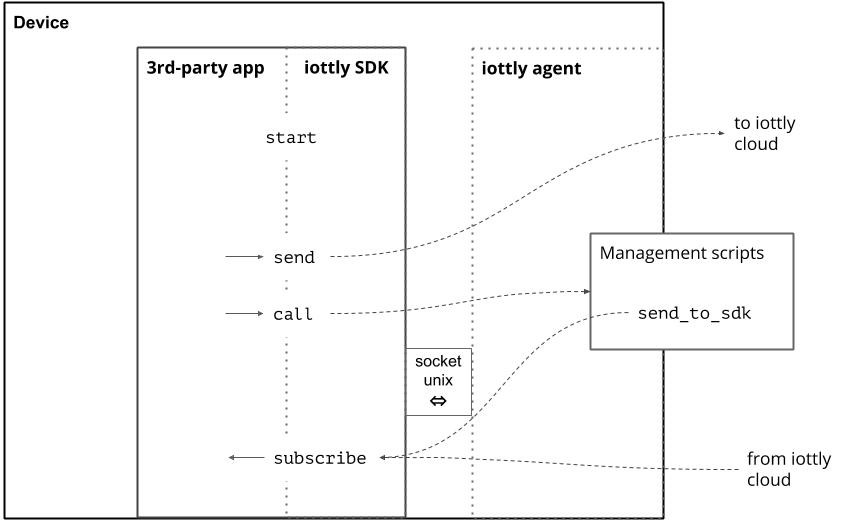
Installation
Install using pip (recommended):
sudo pip3 install https://github.com/tomorrowdata/iottly-sdk-python/archive/1.3.0.tar.gz
The IottlySDK class
Create an instance of IottlySDK, giving your application a name that identifies it in your iottly project (it appears in the dashboard logs).
from iottly_sdk import IottlySDK

iottlysdk = IottlySDK(
    name='myfirstiottlyapp',
    max_buffered_msgs=100,
    on_agent_status_changed=on_agent_status_changed,
    on_connection_status_changed=on_connection_status_changed)
Parameters and keyword arguments:
name(str) — an identifier for the connected application.socket_path(str) — path to the unix-socket exposed by the iottly agent. Defaults to/var/run/iottly.com-agent/sdk/iottly_sdk_socket.max_buffered_msgs(int) — maximum number of messages buffered internally. Defaults to10.on_agent_status_changed(func, optional) — callback for iottly agent status notifications.on_connection_status_changed(func, optional) — callback for the agent connection status.
Agent status callbacks
on_agent_status_changed is called when the SDK connects to and disconnects from the iottly agent. It receives one of:
started— the SDK is successfully linked with the iottly agentstopping— the iottly agent is going through a scheduled rebootstopped— the SDK is disconnected from the iottly agent
on_connection_status_changed is called when the agent notifies a change in the device’s MQTT connectivity. It receives one of:
connected— MQTT is up in the linked iottly agentdisconnected— MQTT is down (messages sent while disconnected are buffered internally)
def on_agent_status_changed(status):
    print('on_agent_status_changed: {}'.format(status))

def on_connection_status_changed(status):
    print('on_connection_status_changed: {}'.format(status))
Subscribing to commands
Use subscribe(cmd_type, callback) to react to a specific command received from the iottly-agent. After subscribing, the SDK invokes your callback—with a dict of command parameters—each time the agent receives a message of that type. Commands are defined in the iottly dashboard / management commands panel.
def on_echo_received(cmdpars):
    print('on_echo_received: {}'.format(cmdpars))

iottlysdk.subscribe(
    cmd_type='echo',
    callback=on_echo_received)
If you call subscribe with a cmd_type that is already registered, the callback is overwritten.
Sending messages
After calling start(), use send(msg, channel=None) to deliver a message to iottly through the local agent. If the agent is unavailable the message is buffered internally—at most max_buffered_msgs are kept, after which the oldest are discarded. The optional channel argument routes the message, for example to a specific webhook.
# start the sdk loops
iottlysdk.start()

# send a message to iottly
iottlysdk.send({'temperature': 22})
The message must be a JSON-serializable dict; otherwise send raises TypeError or ValueError.
Calling agent snippets
Use call_agent(cmd, args) to invoke a Python snippet from the user-defined scripts of the attached iottly agent. Calls are kept synchronous: if the agent is unavailable the call is dropped with a DisconnectedSDK error, which you should trap and retry later once the connection is re-established. The args dict must be JSON-serializable.
Warning: requires iottly agent version ≥ 1.8.0. Calling it against an older agent raises
InvalidAgentVersion.
Example
import time

from iottly_sdk import IottlySDK

# Define callback to receive notifications
# about the iottly agent status:
# -  started
# -  stopping
# -  stopped
def on_agent_status_changed(status):
    print('on_agent_status_changed: {}'.format(status))

# Define callback to receive notifications
# about the iottly agent mqtt connection status:
# -  connected
# -  disconnected
def on_connection_status_changed(status):
    print('on_connection_status_changed: {}'.format(status))

# Create an instance of IottlySDK
iottlysdk = IottlySDK(
    name='myfirstiottlyapp',
    max_buffered_msgs=100,
    on_agent_status_changed=on_agent_status_changed,
    on_connection_status_changed=on_connection_status_changed)

# Define one callback for each incoming command you want
# to subscribe to. Commands are defined in the iottly
# dashboard / management commands panel.
def on_echo_received(cmdpars):
    print('on_echo_received: {}'.format(cmdpars))

def on_examplecommand_received(cmdpars):
    print('on_examplecommand_received: {}'.format(cmdpars))

# Subscribe commands of interest and associate a callback
iottlysdk.subscribe(
    cmd_type='echo',
    callback=on_echo_received)
iottlysdk.subscribe(
    cmd_type='examplecommand',
    callback=on_examplecommand_received)

# Start the sdk loops
iottlysdk.start()

# Main blocking loop of your application. It "reads a
# temperature" and sends it to iottly using 'send'.
while True:
    try:
        s = input(
            '\n^C to exit, "m" to send 1 message, '
            '"l" to send 20 messages:\n')
        if s == 'm':
            # send a message to iottly
            iottlysdk.send({'temperature': 22})
        if s == 'l':
            for t in range(10, 30):
                # send a message to iottly
                iottlysdk.send({'temperature': t})
                time.sleep(1)
    except KeyboardInterrupt:
        break